Two ways to get Phausto running: start from the ready-made Pharo Music image, or load the package into an image you already have and place the native FAUST libraries yourself.
1. Install via Pharo Launcher
This is the shortest route and the one to choose if you are new to Pharo. The Pharo Music distribution is an image with Phausto, Coypu and the native libraries already in place — nothing to download separately, nothing to copy.
Download Pharo Launcher 3.4.4, then:
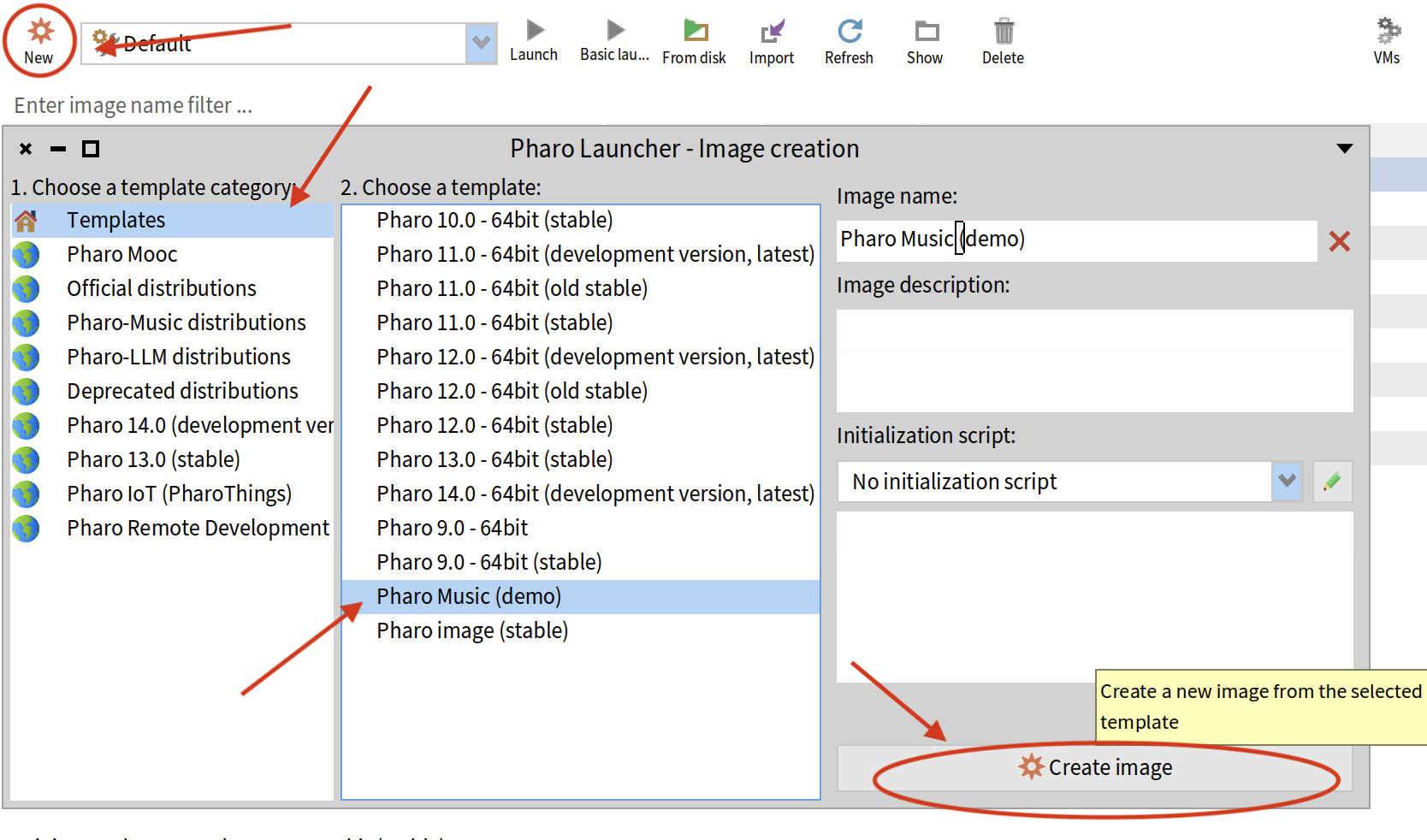
Open a Playground and jump straight to First Sounds — §3 and §4 below do not apply to you.
2. Load via Metacello
To add Phausto to an existing image, evaluate the following in a Playground:
Metacello new
  baseline: 'Phausto';
  repository: 'github://lucretiomsp/phausto:main';
load.2.1 What gets loaded
The baseline pulls in the whole package: the Unit Generator library, the
UI primitives, the
TurboPhausto engine including TpSampler, the
CMajor, JUCE and Bela exporters, and the
Phausto-DesigningSounds examples. It is a single package — there is no
"core only" subset to choose from.
3. Native libraries
Phausto talks to the FAUST dynamic engine over uFFI, so it needs a compiled library for your platform. These are distributed as separate bundles in the repository root rather than through Metacello, because they are platform-specific binaries.
3.1 Choosing the right bundle
| Platform | File |
|---|---|
| macOS (Apple Silicon) | phaustoLibrariesM1.dmg |
| macOS (Intel) | phaustoLibraries_mac_Intel.dmg |
| Windows (Intel) | librariesBundle_windows_intel.zip |
| Linux (Intel) | librariesBundle_Linux.zip |
Download the one that matches your machine from the repository root. Apple Silicon users should take the M1 bundle even when running Pharo under Rosetta is possible — the architectures must match the VM you actually launch.
3.2 Where the bundle goes
Open the archive and place the librariesBundle folder next to your
image file, that is, inside the image's own directory:
Documents/Pharo/images/<yourPhaustoImage>/
  ├── <yourPhaustoImage>.image
  ├── <yourPhaustoImage>.changes
  └── librariesBundle/        ← the folder from the archive
Phausto resolves the library path relative to the running image, so an image moved to a
new folder needs its librariesBundle moved with it.
3.3 Getting past Gatekeeper on macOS
4. Verify the install
Run the smallest possible test in a Playground, one line at a time:
"Create a sine wave oscillator — 440 Hz by default"
sine := SineOsc new.
dsp  := sine asDsp.
dsp init.
dsp start.    "you should hear a tone"
dsp stop.
If you hear a steady tone, the package and the native libraries are both working. If
dsp init raises an error instead, the libraries are the thing to check —
see §7 below.
You can also confirm the engine itself is reachable without making any sound, by asking it for its buffer size:
PhaustoDynamicEngine bufferSize.5. Requirements
| Requirement | Detail |
|---|---|
| Pharo | 11, 12 or 13 |
| Platform | macOS (Apple Silicon or Intel), Windows x64, Linux x64 |
| FAUST | Not required — a compiled runtime ships in the bundle |
| Audio | The system default output device; no configuration step |
7. Troubleshooting
The package loaded, but dsp init raises an error
The native libraries are missing or in the wrong place. Confirm that
librariesBundle sits in the same folder as your .image file, not
beside the Pharo VM and not in pharo-local — see §3.2.
macOS says the library "cannot be opened because the developer cannot be verified"
Right-click the file in Finder and choose Open once. See §3.3.
The DSP starts without error, but there is no sound
Check that dsp start was actually evaluated and not just dsp init,
and that the UGen has a non-zero uLevel. Some UGens — envelopes and physical
models in particular — stay silent until triggered; open dsp displayUI and press
the trigger button. See First Sounds.
Everything worked yesterday, and today the image cannot find the libraries
The image was probably moved or copied without its librariesBundle folder. The
path is resolved relative to the image, so the folder has to travel with it — see §3.2.
I want the newest changes and Metacello keeps giving me a cached version
Metacello caches repositories under pharo-local/iceberg. Delete the cached
lucretiomsp/phausto checkout, or use Iceberg to pull the
main branch directly.